
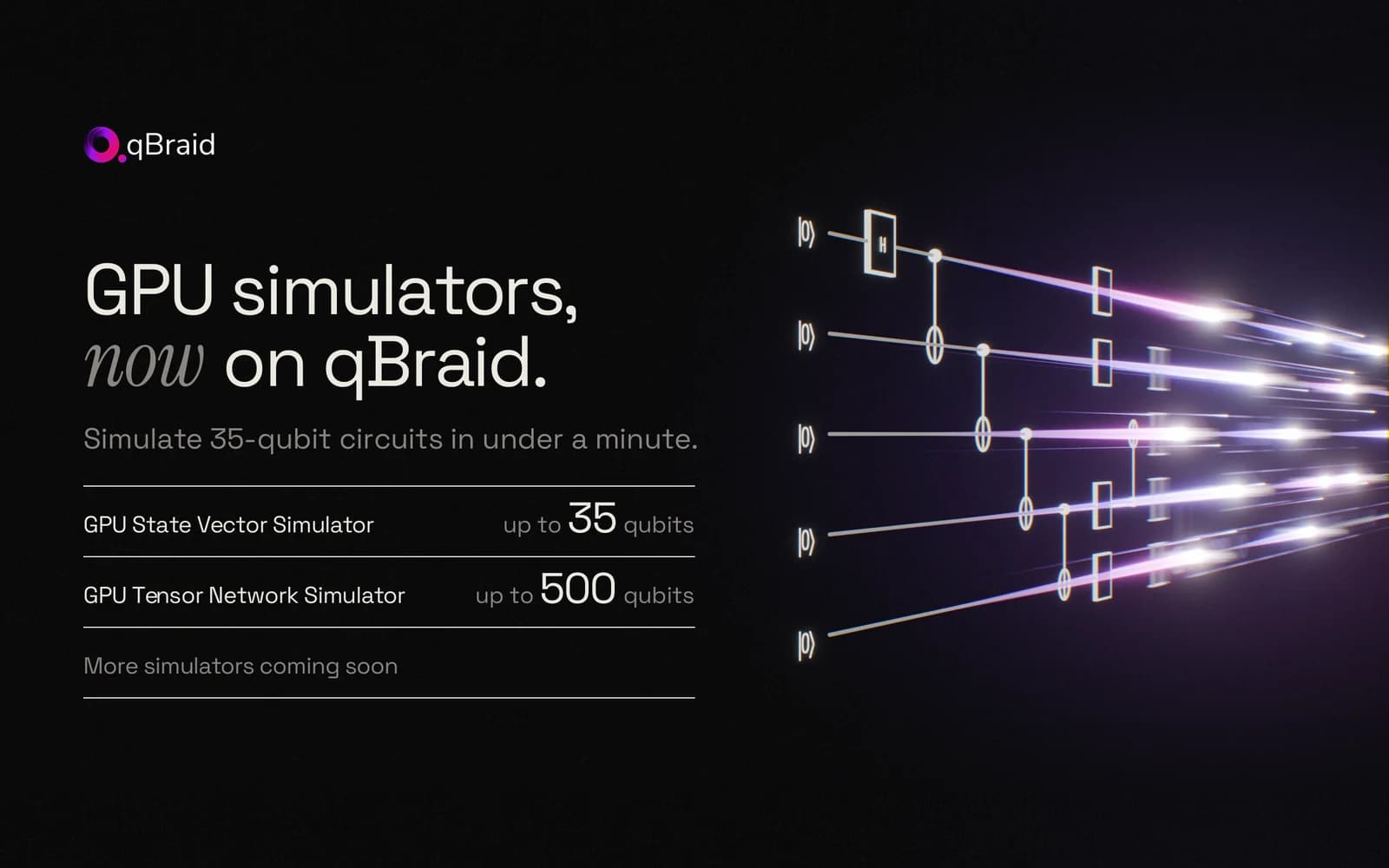
Every qubit you add doubles the work in an exact simulation of a circuit: twice the memory, and about twice the time. On CPUs that adds up quickly. A random 32-qubit circuit took 2 minutes 43 seconds on 32 server CPU cores, and 2.7 seconds on a GPU.
Today we're launching two GPU simulators on qBraid. Every account can use them, through the same SDK and API as every other device on the platform:
- GPU State Vector Simulator (
qbraid:qbraid:sim:gpu-sv) simulates any circuit exactly, up to 35 qubits (34 in double precision). - GPU Tensor Network Simulator (
qbraid:qbraid:sim:gpu-tn) reaches 500 qubits on circuits that stay weakly entangled.
Each comes with a free daily allowance, so you can try both today at no cost.
Using a coding agent? Hand it this prompt and it will set everything up for you. Every option, limit, and error message is in the GPU simulators guide.
What you can do with them
- Check an algorithm at full size before you pay for a QPU. Run your circuit exactly at 30 to 35 qubits and get the ideal distribution, then compare hardware results against it.
- Teach and research past laptop scale. A class can run 32-qubit circuits from a browser notebook, with no cluster accounts and no drivers to install.
- Explore wide circuits. GHZ states, shallow layered circuits, and circuits on chains of neighboring qubits run at hundreds of qubits on gpu-tn.
- Move from simulator to hardware by changing one string. The same
QbraidProviderreaches the QPUs on qBraid too, so moving the code below to hardware is a change of device ID.
How fast: 60 times a 32-core CPU at 32 qubits
We ran the same random circuit, 20 layers deep, on gpu-sv and on Qiskit Aer using 32 CPU cores of the same GH200 server.
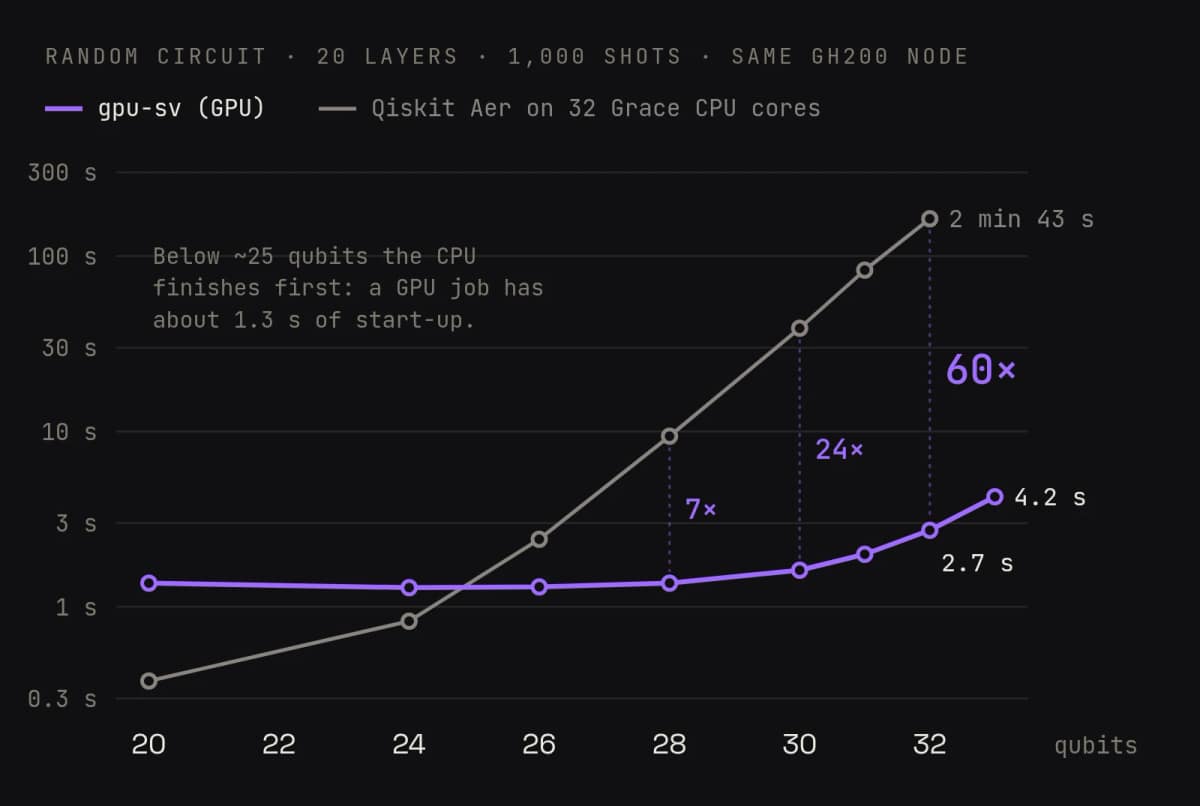
The gap grows with every qubit: the GPU is 7 times faster at 28 qubits, 24 times at 30, and 60 times at 32. Small circuits go the other way. A GPU job spends about 1.3 seconds starting up, so below about 25 qubits the CPU finishes first, and qBraid's CPU simulators remain the better choice.
How big: every qubit doubles the memory
A state-vector simulator stores one complex amplitude for every possible outcome of the circuit: 2n of them for n qubits. In single precision each one takes 8 bytes, so 30 qubits need 8 GiB and 35 qubits need 256 GiB.
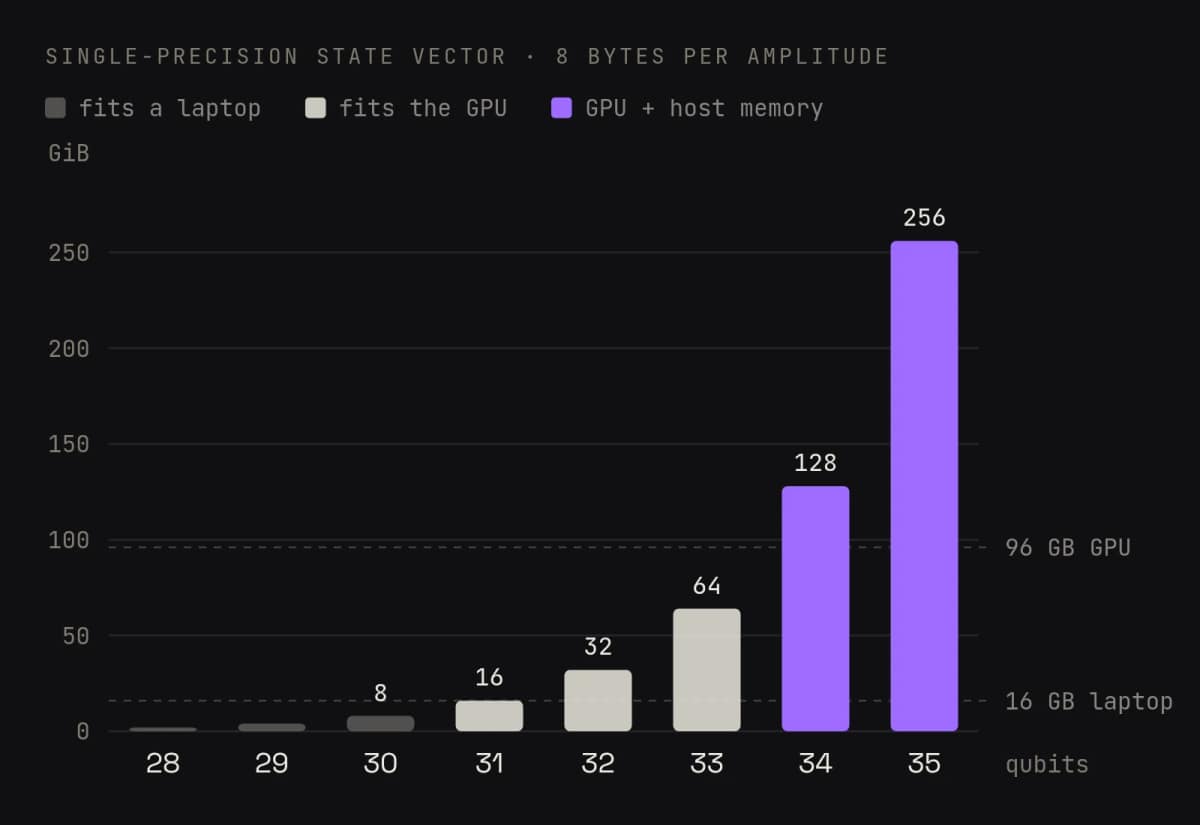
gpu-sv runs on an NVIDIA GH200 Grace Hopper Superchip, whose GPU has 96 GB of memory: enough for 33 qubits. Past that, gpu-sv keeps the rest of the state vector in the memory of the Grace CPU beside it, over the chip's own CPU-to-GPU link. That is how it reaches 35 qubits. There is nothing to configure: a 34- or 35-qubit job extends into host memory on its own.
35 qubits, exact, for about a cent
Here is what gpu-sv takes at its full width:
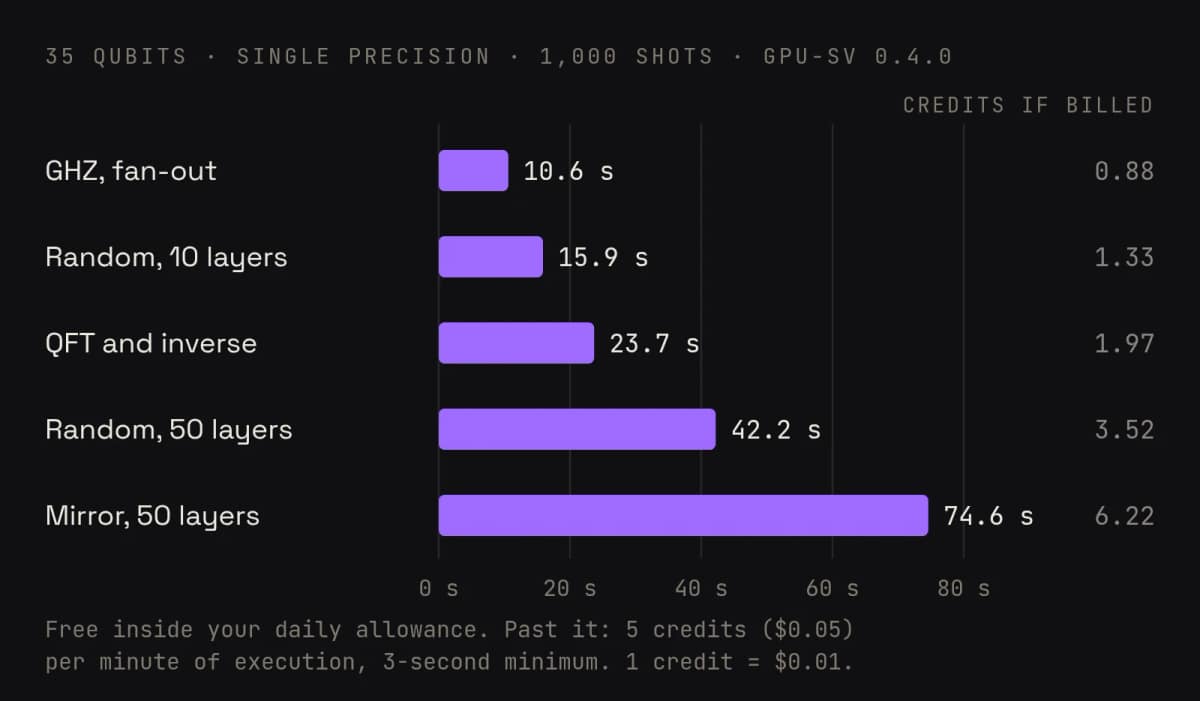
What it costs. Each GPU simulator has its own free daily allowance: 25 jobs a day on the Free plan, 125 on Standard, and unlimited on Pro and Enterprise. The count resets at midnight UTC. Past the allowance, turn on Usage-based billing for GPU simulators under Account › Usage, and further jobs are charged at 5 credits ($0.05) per minute of execution, with a 3-second minimum. A failed job is never charged. So the 35-qubit random circuit above, 10 layers deep, costs 1.33 credits, about a cent, once your allowance is spent.
Past 35 qubits: 500 qubits on gpu-tn
A 500-qubit state vector won't fit in any computer's memory, so gpu-tn stores the state differently. By default it uses a matrix product state (MPS): a chain of small tensors, one per qubit, whose size grows with how entangled the circuit is rather than with how many qubits it has. A 500-qubit GHZ state is a short chain. A deep random circuit across all 500 qubits is not.
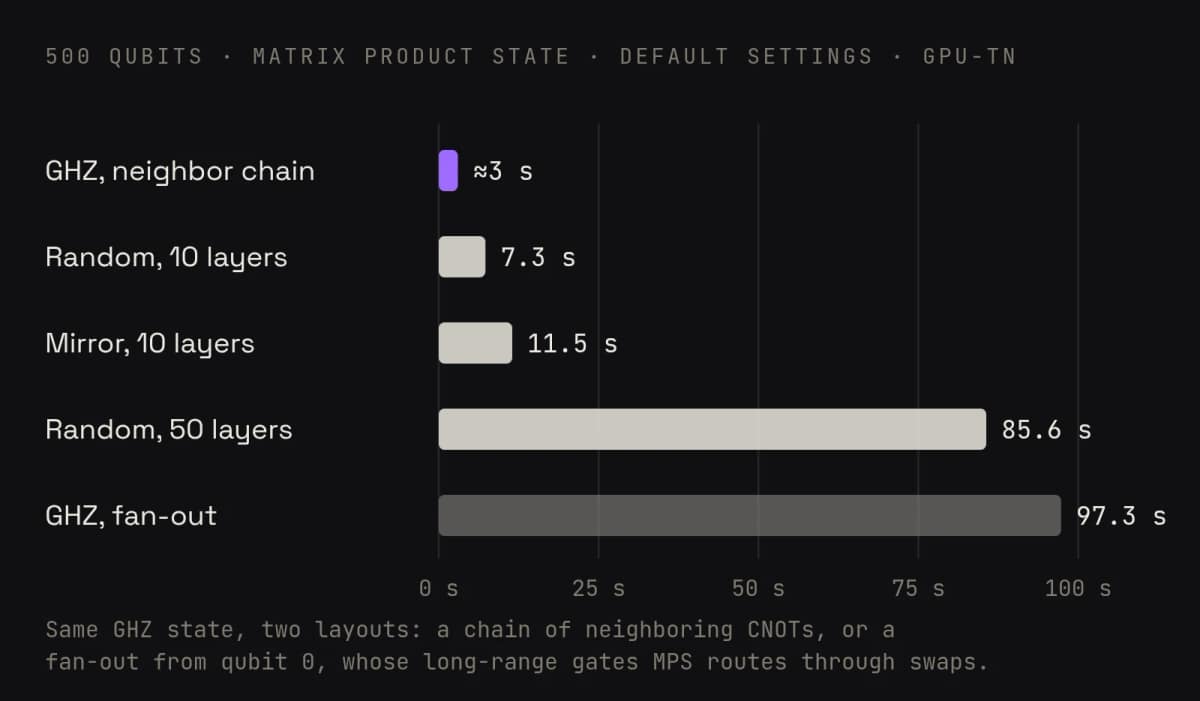
Two things to know about gpu-tn:
- MPS is exact until it truncates. When the entanglement outgrows the bond-dimension cap (
maxBondDim, 64 by default), gpu-tn drops the smallest contributions and samples from an approximation. Every result records the settings it was sampled under, so you always know which you got. To check, raisemaxBondDimand see whether the counts change. - Exact contraction is available too.
method: "exact"contracts the full tensor network. It suits narrower circuits, and gates with more controls than MPS runs. gpu-tn estimates the cost first and refuses a circuit it expects can't finish within its 10-minute limit.
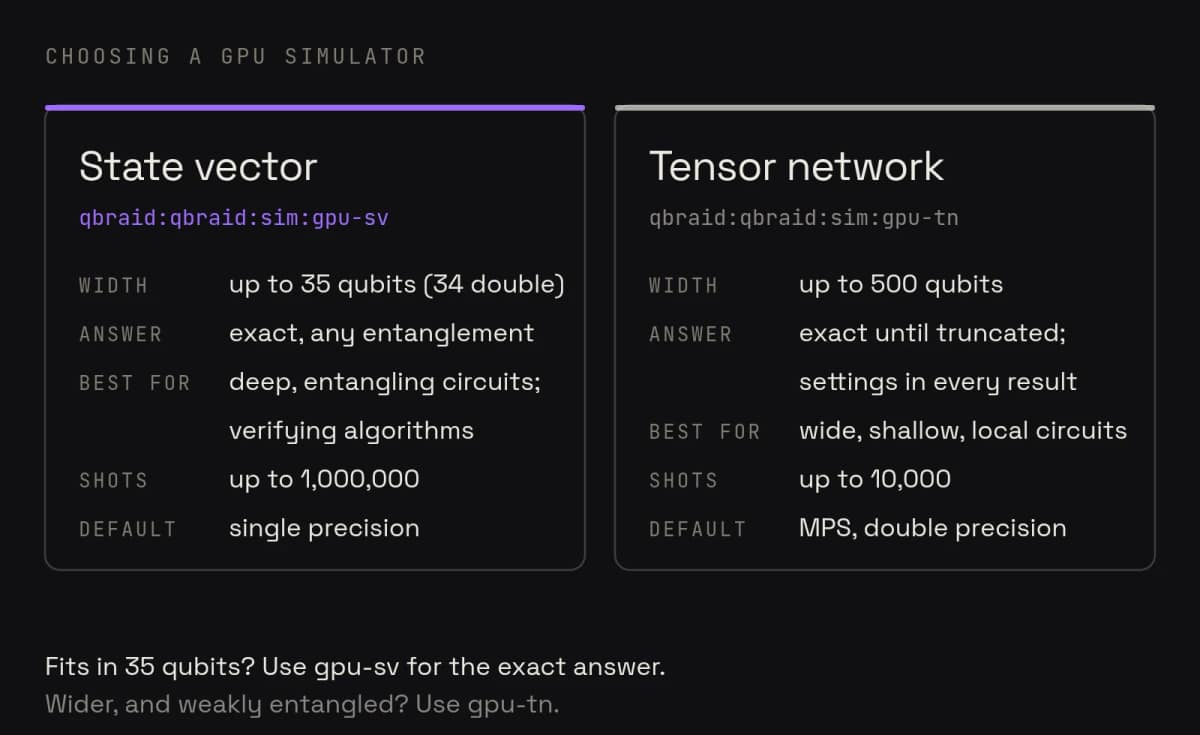
Which one should I use?
Run your first GPU circuit in a minute
Hand this to your agent
If you work with a coding agent, paste this in. It gives the agent the setup steps, both simulators' limits and options, and what jobs cost, then has it run a first circuit.
Set me up to run quantum circuits on qBraid's GPU simulators, then run a first circuit.

Setup
- Install the latest packages: pip install -U qbraid qbraid-cli qiskit
- Credentials: the SDK and CLI read my API key from the QBRAID_API_KEY environment variable or from ~/.qbraid/qbraidrc. Check with qbraid devices get qbraid:qbraid:sim:gpu-sv, which fails with a credentials error if neither is set. In that case, ask me to create a key at https://account.qbraid.com/account/api-keys and run `qbraid configure` myself. Don't ask me to paste the key into this chat, and never write it into the project.
- Reference: https://docs.qbraid.com/v2/sdk/user-guide/providers/native/gpu-simulators has every option, limit and error message. https://qbraid.com/llms.txt covers the rest of the platform.

The two simulators
- qbraid:qbraid:sim:gpu-sv is an exact state-vector simulator: up to 35 qubits in single precision (the default) or 34 in double, and up to 1,000,000 shots. Options: precision ("single" or "double") and timeout (whole seconds).
- qbraid:qbraid:sim:gpu-tn is a tensor-network simulator: up to 500 qubits and 10,000 shots. By default it uses a matrix product state, which is exact until a bond exceeds maxBondDim (default 64) and approximate after that; the result's details record the settings used. Options: method ("mps" or "exact"), maxBondDim (2 to 1024), relativeCutoff, absoluteCutoff, precision (default "double"), numHyperSamples and timeout. "exact" jobs stop after 10 minutes.
- Use gpu-sv whenever the circuit fits in 35 qubits. Use gpu-tn for wider circuits that stay weakly entangled, with two-qubit gates on neighboring qubits.

Running jobs
- Use the Python SDK: device = QbraidProvider().get_device(DEVICE_ID), job = device.run(circuit, shots=N, runtime_options={...}), then job.result().data.get_counts(). runtime_options is optional; leave it out for the defaults. The circuit can be a Qiskit QuantumCircuit or an OpenQASM 2 or 3 string.
- Options go in runtime_options, never as keyword arguments to run(). Both simulators take seed (an integer, 0 to 4294967295) for repeatable counts.
- Circuits measure at the end only: no mid-circuit measurement, no reset after a gate, and no classical control flow.
- Submit one circuit per job. Batch submission isn't available yet.
- A failed job explains itself in job.status().status_message and costs nothing.
- The CLI is handy for checks: qbraid devices get DEVICE_ID shows a simulator's limits and status, and qbraid jobs get JOB_ID shows a job's status.

Cost
- Each simulator has a free daily allowance: 25 jobs on the Free plan, 125 on Standard, unlimited on Pro and Enterprise, reset at 00:00 UTC. Past it, jobs are refused unless I've turned on usage-based billing, which charges 5 credits ($0.05) per minute of execution. Check with me before submitting more than 10 jobs at once.

First run
- Run a 2-qubit Bell circuit (H, CNOT, then measure both qubits) on gpu-sv with 1,000 shots and show me the counts. Only 00 and 11 should appear, about half each.
Or set it up yourself
1. Get an API key. Sign in to qBraid (a free account works) and copy your key from Account › API Keys.
2. Install the SDK and set your key.
pip install -U qbraid qiskit
export QBRAID_API_KEY='your-api-key'
3. Run a circuit on gpu-sv. Write it in Qiskit, and the SDK converts it for you. OpenQASM 2 and 3 strings work too.
from qbraid.runtime import QbraidProvider
from qiskit import QuantumCircuit

provider = QbraidProvider()
sv = provider.get_device("qbraid:qbraid:sim:gpu-sv")

circuit = QuantumCircuit(2)
circuit.h(0)
circuit.cx(0, 1)
circuit.measure_all()

job = sv.run(circuit, shots=1000)
print(job.result().data.get_counts())
# {'00': 517, '11': 483}: exact and noiseless, so only 00 and 11
4. Go wide on gpu-tn. A 100-qubit GHZ state, built from neighboring CNOTs:
tn = provider.get_device("qbraid:qbraid:sim:gpu-tn")

n = 100
ghz = QuantumCircuit(n)
ghz.h(0)
for i in range(n - 1):
    ghz.cx(i, i + 1)  # neighbors only: cheap on a tensor network
ghz.measure_all()

job = tn.run(ghz, shots=1000)
counts = job.result().data.get_counts()
print(len(counts))
# 2: all zeros and all ones, about half each
5. Tune it. Options go in runtime_options. The GPU simulators guide lists every one:
# gpu-sv: double precision, up to 34 qubits
job = sv.run(circuit, shots=1000, runtime_options={"precision": "double"})

# gpu-tn: keep larger bonds, or contract exactly
job = tn.run(ghz, shots=1000, runtime_options={"maxBondDim": 256})
job = tn.run(circuit, shots=1000, runtime_options={"method": "exact"})

print(job.result().details["simulationMethod"])
# tensor_network
Every result records how it was simulated in job.result().details: the method, the precision, and for MPS the truncation settings.
Under the hood
- Hardware. NVIDIA GH200 Grace Hopper Superchips in qBraid's Leo cluster: a Hopper GPU with 96 GB of HBM3, joined to a 72-core Grace CPU and its memory.
- gpu-sv runs on NVIDIA CUDA-Q's GPU state-vector backend (cuStateVec), which moves the part of the state vector that doesn't fit on the GPU into the Grace CPU's memory.
- gpu-tn runs on CUDA-Q's tensor-network backends (cuTensorNet): matrix product state by default, exact contraction on request.
- The platform. Jobs go through qBraid Runtime like every other device: the same SDK, job tracking, and billing, with OpenQASM 2 and 3 as input.
Get started
- Run gpu-sv (exact, to 35 qubits): open the device
- Run gpu-tn (tensor network, to 500 qubits): open the device
- Read the guide: GPU simulators covers every option, limit, and error message
- Need more than 25 jobs a day? Standard includes 125 a day on each simulator, and Pro is unlimited. Compare plans
- Teaching a course or running a research group? Talk to us about access for your students and team.